Answers from your own documents, with sources
Add your policies, procedures and product documents to the knowledge base, and ask Drellia Chat about them. The answer lists the documents it used.
Your team gets the answer your documents actually give, and can check the sources it came from.
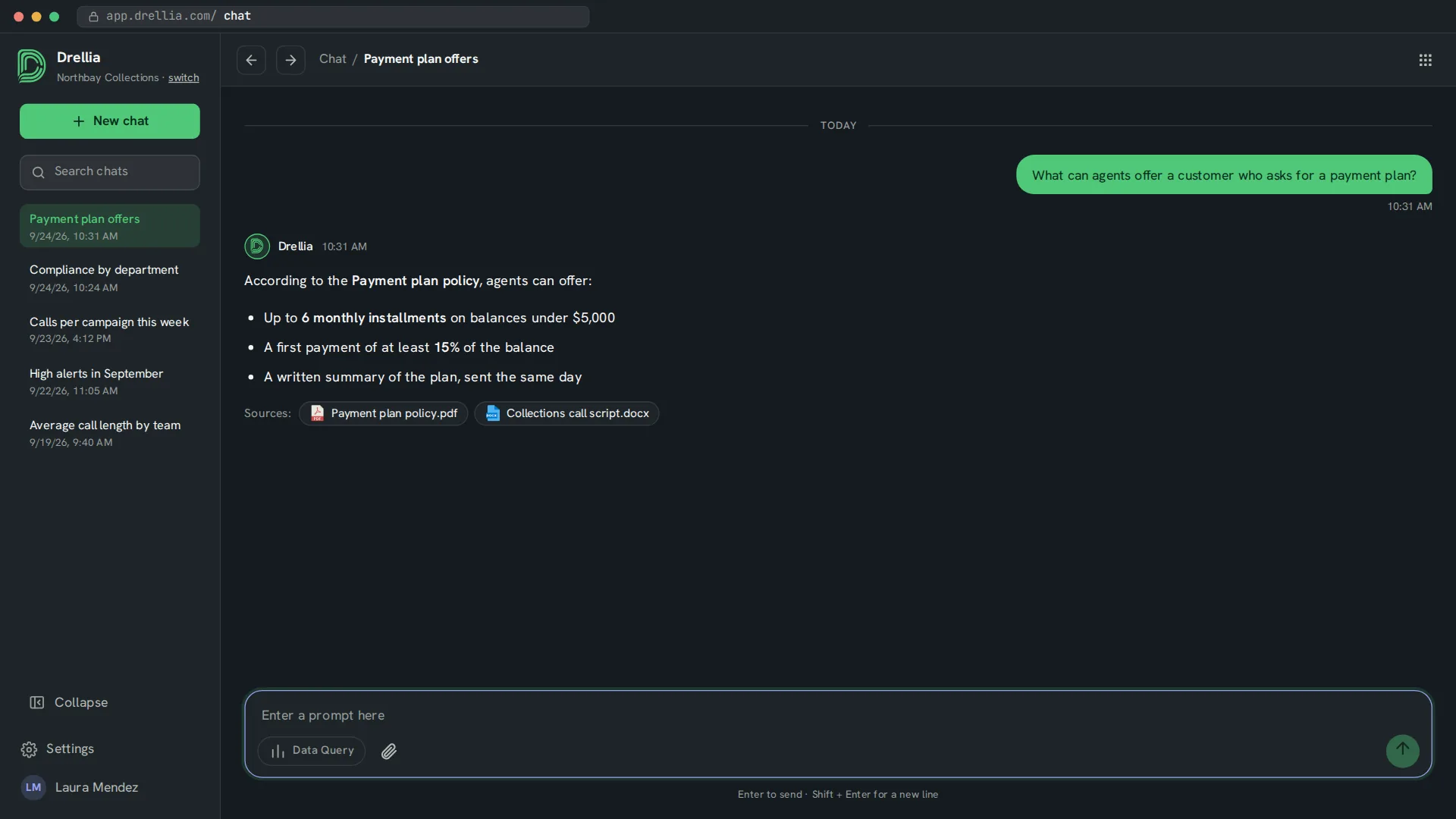
Your documents, one question away
Common file formats
Upload PDF, Word, Excel, PowerPoint, CSV, plain text, HTML and Markdown files.
Processing status
See when each file has been processed and is ready to answer from.
Sources listed
Answers from the knowledge base list the documents they used.
Shared across your organization
Files you add are available to everyone in your organization, and only to them.
From documents to answers
- 01
Add documents
Upload files in Settings, under Files.
- 02
Ask a question
Ask about a policy, a procedure or a product in plain language.
- 03
Check the sources
Read the answer and the list of documents it came from.
Knowledge base: common questions
Which documents can I add?
PDF, Word, Excel, PowerPoint, CSV, plain text, HTML and Markdown files.
How do I know where an answer comes from?
Answers from the knowledge base list the documents they used.
Is my knowledge base visible to other companies?
No. Your documents are only used for your organization.
Related features
See Chat answer from your own documents
Book a 20-minute walkthrough and see it with examples from your own industry.
Book a demo